快速开始
在本指南中,我们将介绍创建调用工具的链和代理的基本方法。工具可以是几乎任何东西——API、函数、数据库等。工具使我们能够将模型的能力扩展到仅仅输出文本/消息之外。将模型与工具一起使用的关键在于正确地提示模型并解析其响应,以便它选择正确的工具并为其提供正确的输入。
设置
本指南中我们需要安装以下包:
%pip install --upgrade --quiet langchain如果你想在 LangSmith 中追踪你的运行,请取消注释并设置以下环境变量:
import getpass
import os

# os.environ ["LANGCHAIN_TRACING_V2"] = "true"
# os.environ ["LANGCHAIN_API_KEY"] = getpass.getpass()
创建工具
首先,我们需要创建一个要调用的工具。在本例中,我们将从函数创建一个自定义工具。有关创建自定义工具的更多信息,请参阅 本指南。
from langchain_core.tools import tool


@tool
def multiply(first_int: int, second_int: int) -> int:
    """Multiply two integers together."""
return first_int * second_intprint(multiply.name)
print(multiply.description)
print(multiply.args)multiply
multiply(first_int: int, second_int: int) -> int - Multiply two integers together.
{'first_int': {'title': 'First Int', 'type': 'integer'}, 'second_int': {'title': 'Second Int', 'type': 'integer'}}multiply.invoke({"first_int": 4, "second_int": 5})20链
如果我们知道只需要固定次数地使用一个工具,我们可以为此创建一个链。让我们创建一个简单的链,它只是将用户指定的数字相乘。
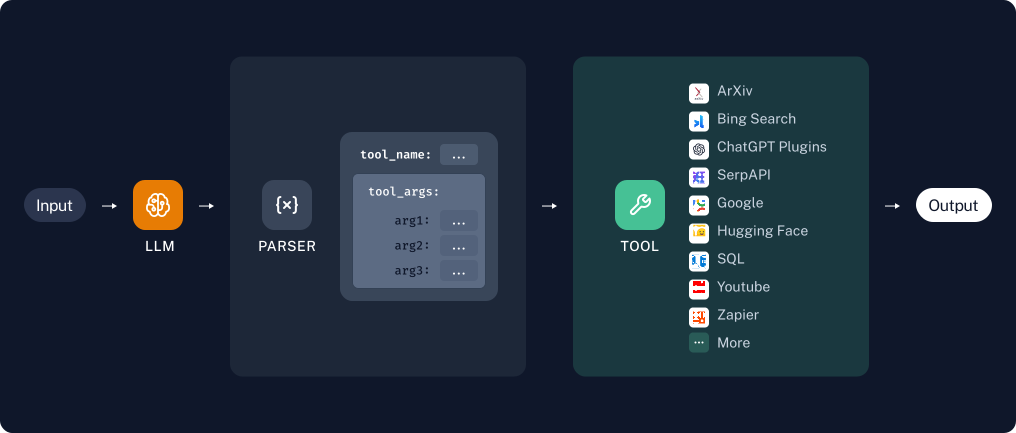
工具/函数调用
将工具与 LLM 一起使用的最可靠方式之一是使用工具调用 API(有时也称为函数调用)。这仅适用于显式支持工具调用的模型。你可以在 这里 查看哪些模型支持工具调用,并在 本指南 中了解有关如何使用工具调用的更多信息。
首先我们定义模型和工具。我们将从单个工具 multiply 开始。
from langchain_openai.chat_models import ChatOpenAI

llm = ChatOpenAI(model="gpt-3.5-turbo-0125", temperature=0)
我们将使用 bind_tools 将工具的定义作为模型每次调用的一部分传入,以便模型可以在适当时调用该工具:
llm_with_tools = llm.bind_tools([multiply])当模型调用工具时,这将显示在输出的 AIMessage.tool_calls 属性中:
msg = llm_with_tools.invoke("whats 5 times forty two")
msg.tool_calls
[{'name': 'multiply',
'args': {'first_int': 5, 'second_int': 42},
'id': 'call_cCP9oA3tRz7HDrjFn1FdmDaG'}]请查看 这里的 LangSmith 追踪 (opens in a new tab)。
调用工具
很好!我们能够生成工具调用。但是如果我们想真正调用该工具呢?为此,我们需要将生成的工具参数传递给我的工具。作为一个简单的示例,我们只提取第一个 tool_call 的参数:
from operator import itemgetter

chain = llm_with_tools | (lambda x: x.tool_calls[0]["args"]) | multiply
chain.invoke("What's four times 23")92请查看 这里的 LangSmith 追踪 (opens in a new tab)。
代理
当我们知道任何用户输入所需的工具使用特定顺序时,链非常有用。但是对于某些用例,我们使用工具的次数取决于输入。在这些情况下,我们希望让模型自己决定使用工具的次数和顺序。代理 让我们做到这一点。
LangChain 附带了若干针对不同用例优化的内置代理。阅读有关所有 代理类型的信息。
我们将使用 工具调用代理,它通常是最可靠的类型,也是大多数用例推荐的类型。
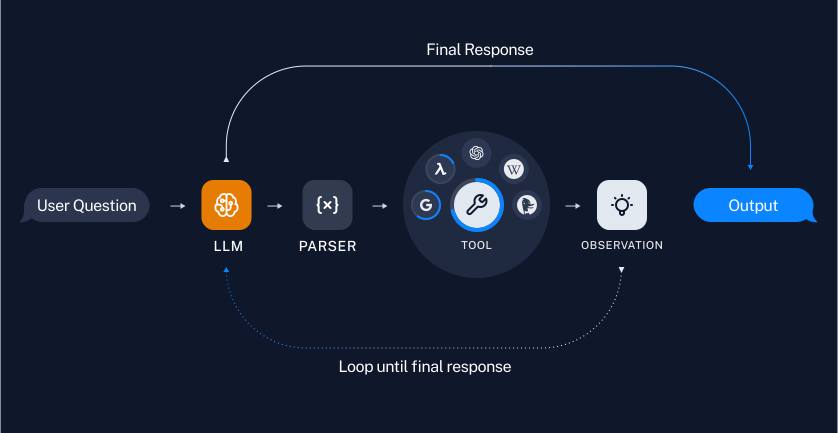
from langchain import hub
from langchain.agents import AgentExecutor, create_tool_calling_agent
# Get the prompt to use - can be replaced with any prompt that includes variables "agent_scratchpad" and "input"!
prompt = hub.pull("hwchase17/openai-tools-agent")
prompt.pretty_print()================================[1m System Message [0m================================
You are a helpful assistant
=============================[1m Messages Placeholder [0m=============================
[33;1m[1;3m{chat_history}[0m
================================[1m Human Message [0m=================================
[33;1m[1;3m{input}[0m
=============================[1m Messages Placeholder [0m=============================
[33;1m[1;3m{agent_scratchpad}[0m代理也很棒,因为它们使使用多个工具变得容易。要了解如何构建使用多个工具的链,请查看 多工具链 页面。
@tool
def add(first_int: int, second_int: int) -> int:
    "Add two integers."
    return first_int + second_int


@tool
def exponentiate(base: int, exponent: int) -> int:
    "Exponentiate the base to the exponent power."
    return base**exponent


tools = [multiply, add, exponentiate]
# Construct the tool calling agent
agent = create_tool_calling_agent(llm, tools, prompt)# Create an agent executor by passing in the agent and tools
agent_executor = AgentExecutor(agent=agent, tools=tools, verbose=True)使用代理,我们可以提出需要任意多次使用我们工具的问题:
agent_executor.invoke(
    {
        "input": "Take 3 to the fifth power and multiply that by the sum of twelve and three, then square the whole result"
    }
)
[1m> Entering new AgentExecutor chain...[0m
[32;1m[1;3m
Invoking: `exponentiate` with `{'base': 3, 'exponent': 5}`


[0m[38;5;200m[1;3m243[0m[32;1m[1;3m
Invoking: `add` with `{'first_int': 12, 'second_int': 3}`


[0m[33;1m[1;3m15[0m[32;1m[1;3m
Invoking: `multiply` with `{'first_int': 243, 'second_int': 15}`


[0m[36;1m[1;3m3645[0m[32;1m[1;3m
Invoking: `exponentiate` with `{'base': 405, 'exponent': 2}`


[0m[38;5;200m[1;3m164025[0m[32;1m[1;3mThe result of taking 3 to the fifth power is 243.

The sum of twelve and three is 15.

Multiplying 243 by 15 gives 3645.

Finally, squaring 3645 gives 164025.[0m

[1m> Finished chain.[0m
{'input': 'Take 3 to the fifth power and multiply that by the sum of twelve and three, then square the whole result',
'output': 'The result of taking 3 to the fifth power is 243. \n\nThe sum of twelve and three is 15. \n\nMultiplying 243 by 15 gives 3645. \n\nFinally, squaring 3645 gives 164025.'}请查看 这里的 LangSmith 追踪 (opens in a new tab)。
下一步
在这里,我们已经介绍了将工具与链和代理一起使用的基本方法。我们推荐以下部分以供进一步探索: